Every day you decide what agent, model, and effort level to use for a specific task.
For difficult or strategic problems, I mostly use Claude Opus 5.5. For high-volume straightforward tasks, cheaper models like Luna, DeepSeek, or Haiku are good enough. And for writing, it's usually Gemini Argon.
But how do you really know if you're using the best model for the job?
My baseline rule of thumb: Artificial Analysis
I typically use Artificial Analysis's Intelligence Index vs. cost per task chart. You can look along the frontier edge to see the best bang for your buck at any given intelligence level.
 The dotted line is the frontier: the highest score you can get at each cost per task. Source: Artificial Analysis.
Why public benchmarks fall short on real work
Artificial Analysis and similar public benchmarks work well as basic guides, but they have big gaps:
- 1. Benchmaxxing: AI labs optimize models to game public evals like SWE-bench, MMLU, and HumanEval. You've probably tried a new model that topped the charts but sucked when you actually used it. Over time, this makes public evals less reliable at measuring real-world performance.
- 2. They measure the wrong thing: Public evals test contrived math and coding puzzles, not your actual work. My week spans content creation on YouTube, building apps, social media marketing, and running a newsletter. None of that is Humanity's hardest problems.
- 3. Speed traps: Many cheap models only reach the frontier on max thinking, so you save pennies on a task but wait tens of minutes. I'll often pay a little more to get work done faster.
More importantly, a raw LLM doesn't do your work in isolation. Your real unit of performance is the full agent configuration: the model, thinking level, agent harness, and the skills loaded into context.
The better way: test full agent configurations on your own tasks
So the test that matters is the full agent configuration, run on your own real-world work.
For me, that means knowing which configuration is best for things like:
- Generating optimized YouTube thumbnails
- Designing and building animations
- Front-end web and macOS UI design
- Critiquing and editing my newsletter
- Fixing bugs
For each task, I want the agent that gives the highest quality at the lowest cost in the shortest time.
On my writing task, the profile matters more than the model
Here's what this looks like on a real task from my everyday work: taking a rough draft of my newsletter and editing it for readability, flow, skimming, and SEO.
I ran that task on three agents at medium effort: Opus 5.5 in Claude Code, GPT-6.1 Sol in Codex, and Gemini 4 Argon in Antigravity. Each one ran twice, with and without my creator profile.
A profile is the set of skills and context files an agent loads. Mine comes from Agent Profile Kit (apkit), a free, open-source tool I introduced in my last issue that keeps a single source of truth for your context files and skills and syncs them across your projects and agents.
Like Artificial Analysis, the chart plots performance vs. cost per task. Hollow points have no profile. Solid points include my creator profile.
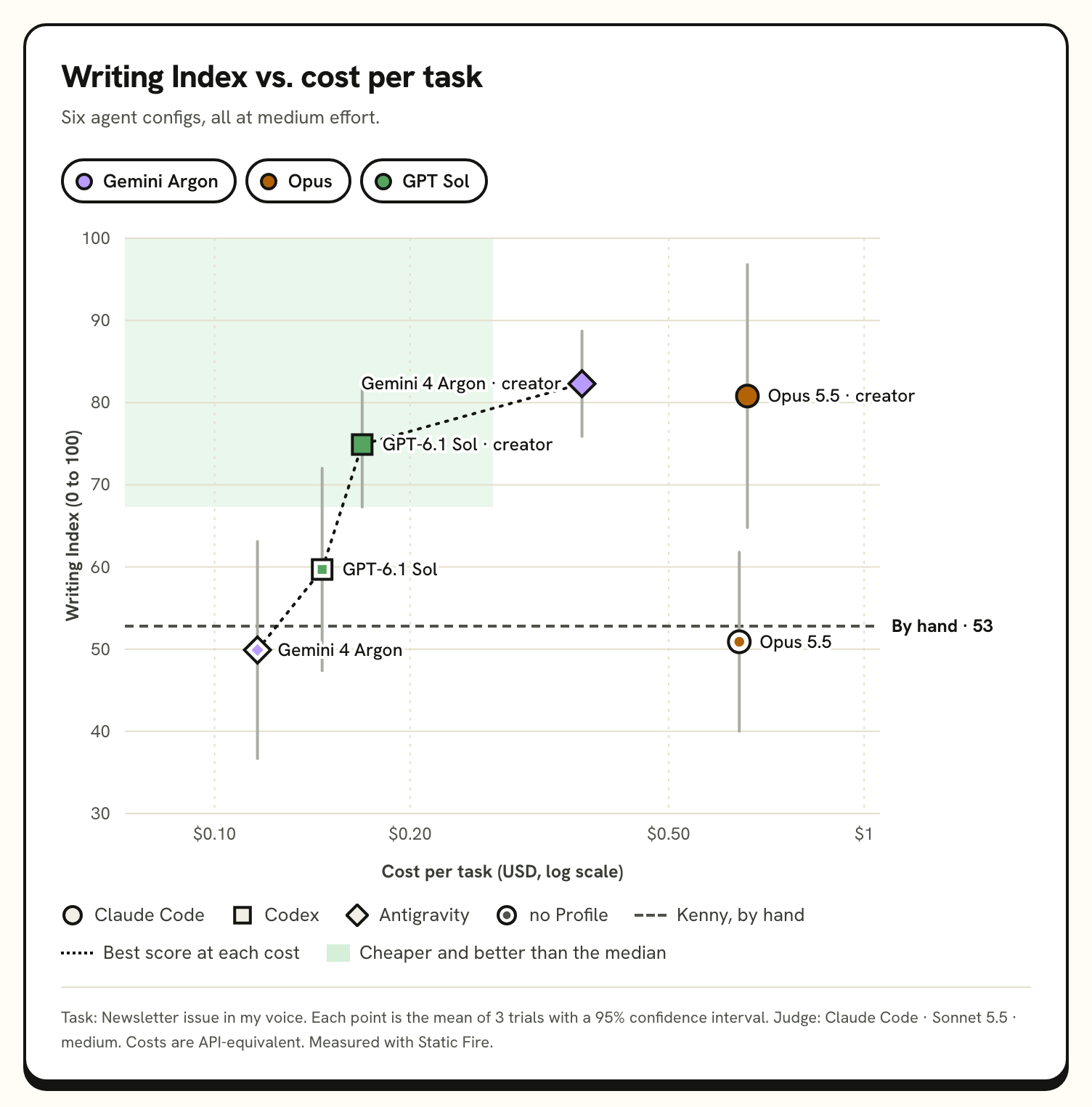
Adding my creator profile lifted every model by roughly 15 to 30 points.
Without my profile, all three models scored between 50 and 60. With it, the same three scored between 75 and 82.
Cost tells a second story. With my profile, GPT-6.1 Sol scored 75 at $0.17 per task. Opus 5.5 scored 81 at $0.65: six points more for almost four times the cost.
How to run this yourself
To do this for your own work, ask your agent to write an eval for a specific task you run often. Open Claude in a folder with a real example of the task, and paste this:
I want to compare AI agent configurations on a real task from my work: [DESCRIBE THE TASK].

Create a repeatable eval in a new `evals/` folder with:
1. `input/`: a prompt for the task and the starter files. Use a real example from this folder, and write the prompt yourself if I don't have the original.
2. `rubric.md`: a 0-100 grading rubric with 4 concrete criteria an LLM judge can score the same way every time.
3. `run-eval.md`: a short checklist for running the same task on two models or skill setups and comparing quality, time, and cost.

Before you write the files, ask me 3 questions about the task and what a great result looks like.
Then run the same task on each agent configuration and compare the scores. It answers questions no public benchmark can, like:
- Does my skill actually make my agent better at this task?
- What is the lowest thinking level that still gives me the quality I want?
Want this as a free tool?
I'm thinking about turning the tool I used to generate the chart above into a free, open-source tool so you can run your own personal evals. If you're interested, reply with one task you want to test your agents on. I'll use your answers to guide how I build it.
See you next Tuesday,
Kenny
P.S. Want an AI workflow built and tested for your team? Learn more about AI Build and how I saved a wealth management startup $25K/year.